

What is this feature?
The Submit Your Feedback feature allows Playlab users to share their experiences, suggestions, bug reports, and feature requests directly with the Playlab team. Your input helps us continuously improve Playlab and build features that matter most to our community. Whether you’ve discovered a bug, have an idea for a new feature, or want to share how Playlab has helped you, we want to hear from you.All feedback is reviewed by our team. While we may not be able to respond to every submission individually, your input directly influences our product roadmap.
Rationale for the feature
User feedback is essential for helping us build a Playlab that reflects our community. that truly serves our community’s needs. By collecting insights from builders, educators, and creators using Playlab, we can identify pain points, discover new use cases, and prioritize features that will have the greatest impact. Your feedback helps us understand how Playlab fits into your workflow and where we can make meaningful improvements.How to submit feedback
1
Identify your feedback type
Determine whether you’re reporting a bug, suggesting a feature, sharing a success story, or providing general feedback about your Playlab experience.
Different types of feedback help us categorize and prioritize responses appropriately.
2
Access the feedback form
Click the “Submit Your Feedback” button above, or find the feedback option in your Playlab dashboard.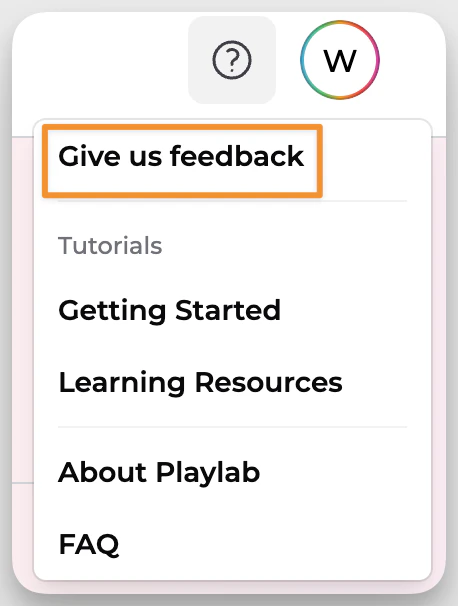
3
Provide detailed information
Fill out the form with as much detail as possible. Include screenshots, steps to reproduce issues, or examples of how a feature would help your work.
4
Submit and track
Submit your feedback and keep an eye on your email for any follow-up questions or updates from our team.
Tips for effective feedback
FAQ
How quickly will I hear back about my feedback?
How quickly will I hear back about my feedback?
We aim to acknowledge all feedback within 48 hours. Complex issues or feature requests are not guaranteed to make it into the product, but all requests will be logged. If we pick up the request, it may take longer to fully address, but we’ll keep you updated on progress.
Can I submit anonymous feedback?
Can I submit anonymous feedback?
Yes, you can choose to submit feedback anonymously. However, providing your contact information allows us to follow up for clarification if needed.
What types of feedback are most helpful?
What types of feedback are most helpful?
All feedback is valuable! Bug reports with clear reproduction steps, feature requests with specific use cases, and detailed user experience feedback are particularly helpful for our development process.
Do you implement all suggested features?
Do you implement all suggested features?
While we can’t implement every suggestion, we carefully review all feedback and prioritize features based on user needs, technical feasibility, and alignment with our product vision.
Can I suggest improvements to existing features?
Can I suggest improvements to existing features?
Absolutely! We welcome suggestions for improving existing functionality. Please describe what’s working well and what could be enhanced.
Is there a limit to how much feedback I can submit?
Is there a limit to how much feedback I can submit?
No limit! We encourage ongoing feedback as you continue using Playlab. Regular users often provide the most valuable insights into our platform.
How do you prioritize feedback and feature requests?
How do you prioritize feedback and feature requests?
We prioritize based on factors like user impact, frequency of requests, alignment with our roadmap, and technical complexity. Critical bugs always take priority.
We Want Your Feedback!
Your voice shapes the future of Playlab. Whether you’re a new user or a seasoned builder, your perspective helps us create better tools for everyone. Contact us directly at support@playlab.ai or use our feedback form above.Last updated: 09-10-2025